
10 SEO Tasks You Should Do Every Month (30-Minute Checklist)
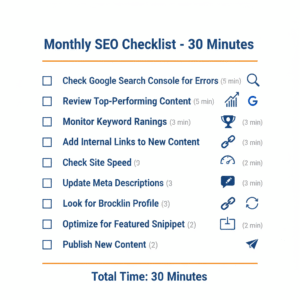
This monthly SEO checklist gives small business owners ten simple tasks that take just 30 minutes to complete.
When was the last time you actually looked at your website’s SEO?
If you run a small business, the honest answer is probably “when I first set it up” or “never.” And that makes complete sense. You have customers to serve, invoices to send, and about seventeen other fires to deal with at any given moment.
But here is the reality: 61% of small businesses are currently not investing in SEO WordStream, and that gap is exactly where your opportunity lives. Because the ones who do it consistently are quietly pulling ahead.
The good news is you do not need hours every week. You need 30 minutes a month and a checklist you can actually follow.
Here are 10 monthly SEO tasks that keep your website healthy, visible, and climbing — without requiring a marketing degree or an agency retainer.
Why a Monthly SEO Routine Matters
Think of your website like a car. You do not wait until something breaks to check the oil. Regular maintenance keeps things running smoothly and prevents expensive problems down the road.
SEO works the same way. Without regular check-ups, small issues become big problems. Rankings slip. Traffic drops. Competitors pass you by.
In 2024, 91% of respondents confirmed that SEO positively affected both website performance and their overall marketing goals DemandSage, according to Conductor. The businesses seeing those results are not the ones doing one big heroic effort every year. They are the ones showing up consistently every month.
Your 30-Minute Monthly SEO Checklist
Task 1: Check Google Search Console for Errors (5 minutes)
This is your first stop every month. Google Search Console is a free tool that shows you exactly how Google sees your website, including any problems hurting your rankings.
Log in, click Coverage in the left sidebar, and look for red errors. Check for pages that should be indexed but are not, mobile usability issues, and broken links. Most errors have simple fixes — often just re-submitting a page or correcting a broken internal link.
If you have not set up Google Search Console yet, do it today. It is non-negotiable.
Task 2: Review Your Top-Performing Content (5 minutes)
Go to Google Analytics and look at your top 10 pages by organic traffic over the last 30 days. Note what is performing well and flag anything that used to do well but is now declining. Make a short list of two or three pieces to refresh next month.
Content that is outdated gradually loses rankings. Updating it with new information, current statistics, or improved formatting can give it new life without starting from scratch.
Task 3: Monitor Your Keyword Rankings (3 minutes)
Check your rankings for your five to ten most important keywords. Note any significant movement up or down. If rankings are improving, keep doing what you are doing. If they are dropping, check for technical issues or stronger competitor content.
A rank tracking tool like PokkadotSEO’s Rank Tracker makes this automatic — you can see at a glance what is moving and what is stalling.
Task 4: Add Internal Links to New Content (3 minutes)
Internal linking is one of the most underused SEO tactics. It helps search engines discover your content, distributes ranking power across your site, and keeps visitors engaged longer.
Look at anything you published in the last month, go back to two or three older related posts, and add a natural contextual link from the old content to the new. Make sure your anchor text is descriptive, not just “click here.”
Use PokkadotSEO’s Site Audit to find orphan pages — pages with no internal links pointing to them. Google has a much harder time finding and ranking those.
Task 5: Check Your Site Speed (2 minutes)
Page speed is a confirmed Google ranking factor and it directly affects whether visitors stay or leave. Go to Google PageSpeed Insights and test your homepage and your two or three most important pages.
70% of users say a site’s page speed impacts their willingness to buy from an online retailer Marketing LTB. If your scores are below 50, prioritize fixing it. The most common culprit is uncompressed images.
Task 6: Update Your Meta Descriptions (3 minutes)
Meta descriptions do not directly affect rankings but they have a massive impact on whether someone clicks your result or your competitor’s. Pick two or three important pages, check what their meta descriptions currently say, and rewrite any that are generic or missing a clear benefit.
Keep them between 150 and 160 characters, include your target keyword naturally, and end with a subtle reason to click. PokkadotSEO’s Content Analyzer flags pages with missing or poorly optimized meta descriptions automatically.
Task 7: Scan for Broken Links (2 minutes)
Broken links create dead ends for visitors and signal to Google that your site is not well maintained. Use PokkadotSEO’s Site Audit or a free browser extension to scan for 404 errors and redirect chains. Fix broken internal links by updating them to the correct URL, and either fix or remove broken external links.
If you have deleted a page, set up a 301 redirect from the old URL to a relevant existing page. This preserves whatever SEO value that page had built up.
Task 8: Review Your Backlink Profile (3 minutes)
Backlinks from other websites to yours remain one of the most important ranking factors. Top pages in Google have approximately 3.8 times more backlinks than lower-ranked ones. SeoProfy
Check your backlink profile using Google Search Console or PokkadotSEO’s Backlink Checker. Look for new links you have gained, and flag any that look spammy or come from completely unrelated sites. Quality matters far more than quantity here.
Task 9: Optimize for One Featured Snippet (2 minutes)
Featured snippets are the answer boxes that appear above regular search results — what some people call position zero. Getting one can significantly increase your traffic for that keyword without improving your traditional ranking at all.
Use Google Search Console to find keywords you rank between positions two and ten for. Search those keywords yourself and see if there is a featured snippet. If there is, look at its format — paragraph, list, or table — and update your content to match that format with a cleaner, more direct answer.
Task 10: Publish or Schedule One New Piece of Content (2 minutes)
This one is not maintenance — it is growth. Google consistently rewards sites that publish fresh, valuable content. One focused post per month answering a specific question your customers are already asking is more valuable than three rushed posts that say nothing new.
It does not have to be 3,000 words. An 800-word post that genuinely answers one question your ideal customer is searching for is enough. Twelve posts over a year means twelve new pages that could rank and bring in new visitors.
The 30-Minute Breakdown
Check Google Search Console — 5 minutes Review top-performing content — 5 minutes Monitor keyword rankings — 3 minutes Add internal links — 3 minutes Check site speed — 2 minutes Update meta descriptions — 3 minutes Scan for broken links — 2 minutes Review backlink profile — 3 minutes Optimize for a featured snippet — 2 minutes Publish new content — 2 minutes
Total: 30 minutes.
What If You Find Bigger Problems?
Sometimes your monthly check will turn up something that takes more than a few minutes to fix. Maybe you find 50 broken links. Maybe your site speed is terrible across the board. Do not panic and do not try to fix everything at once.
Note the problem, prioritize it, and schedule dedicated time to address it outside your monthly 30 minutes. Your checklist is for maintenance and monitoring. Major overhauls are separate projects.
Common Mistakes That Kill Monthly SEO Routines
Skipping months because you are busy. This defeats the entire purpose. Monthly SEO works because of consistency. Put it on your calendar like a client meeting you cannot cancel.
Spending too much time on low-impact tasks. It is easy to spend 20 minutes on one meta description while ignoring critical errors in Search Console. Stick to the time limits.
Not tracking your progress. Without recording what you find, you cannot see patterns or improvement over time. A simple notes document where you jot down your top keyword rankings each month is enough.
Beyond Monthly: What to Do Quarterly and Yearly
Monthly tasks maintain your SEO. Quarterly tasks push it forward. Every three months, do a more comprehensive content audit to find outdated or underperforming posts, run a competitor analysis, and consider a targeted backlink outreach effort.
Once a year, step back and review your full keyword strategy. Search behavior shifts. What people typed into Google two years ago is not always what they are typing today.
Tools That Make This Actually Manageable
Trying to do monthly SEO without the right tools is like trying to fix a car without a wrench.
The free essentials are Google Search Console, Google Analytics, and Google PageSpeed Insights. For everything else — rank tracking, site audits, content analysis, backlink monitoring, and internal link mapping — PokkadotSEO puts it all in one dashboard built specifically for small businesses who do not have time to learn ten different tools.
Try PokkadotSEO free at pokkadotseo.web.app and run your first site audit today.
The Bottom Line
49% of marketers say SEO provides a better return on investment than any other marketing strategy. WebFX But only if you actually do it.
Thirty minutes a month does not sound like much. But twelve months of consistent check-ups, fixes, and fresh content compounds into something real. Rankings improve gradually. Traffic builds. And while your competitors are either ignoring SEO entirely or paying thousands a month for an agency, you are quietly gaining ground for the cost of half an hour.
Pick a date this month. Put it on your calendar. Set a timer for 30 minutes and work through this list.
Then do it again next month.
Want to find out why you need Lead Magnets? Read the post HERE