Your step-by-step guide to showing up when customers search “near me” and outranking national chains in your local market.
Let me guess: You run a great local business. Your customers love you. You get fantastic reviews.
But when someone searches for your type of business in your city… your competitors show up instead of you.
Even worse? Sometimes it’s big national chains that don’t even HAVE a location in your area. Yet there they are, stealing your customers.
That ends today.
This checklist shows you exactly how to dominate local search results – no expensive agency required. Just follow these steps and watch your “near me” rankings skyrocket.
Why Local SEO is a Goldmine for Small Businesses
Before we dive in, let’s talk about why this matters so much:
46% of all Google searches have local intent. That means nearly half of all searches are people looking for businesses near them RIGHT NOW.
These aren’t people casually browsing. They’re ready to call, visit, or book. They’re YOUR ideal customers.
But if you’re not showing up in those searches, you’re invisible. And invisible businesses don’t get customers.
The good news? Local SEO is way easier than regular SEO because you’re only competing with businesses in your area – not the entire internet.
The Complete Local SEO Checklist
Step 1: Claim and Optimize Your Google Business Profile
This is THE most important thing you can do for local SEO. If you do nothing else on this list, do this.
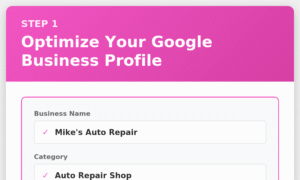
What to do:
- Go to google.com/business and claim your listing
- Verify your business (usually by postcard or phone)
- Fill out EVERY section completely:
- Business name (exactly as it appears on your storefront)
- Address (use your actual location, not a PO box)
- Phone number (local number works best)
- Website URL
- Business category (primary + additional categories)
- Business hours (including special hours for holidays)
- Services or menu (add everything you offer)
- Photos (at least 10 high-quality images)
Pro tips:
- Write a 750-word business description packed with your target keywords
- Add “attributes” (women-owned, wheelchair accessible, etc.)
- Post weekly updates (photos, offers, events)
- Respond to EVERY review within 24 hours
Why it works: Google Business Profile listings appear ABOVE regular search results in the “map pack.” That’s prime real estate.
Real example: A local coffee shop wasn’t showing up for “coffee near me.” Turned out they never claimed their listing – Google created one automatically but it had wrong hours and no photos. After claiming and optimizing it, they jumped to #1 in the map pack within two weeks.
Step 2: Get Your NAP Consistent Everywhere
NAP = Name, Address, Phone Number
Google checks if your business information matches across the entire internet. If it doesn’t, you lose trust (and rankings).
What to do:
Make a list of everywhere your business is listed online:
- Your website
- Google Business Profile
- Facebook, Instagram, LinkedIn
- Yelp, Better Business Bureau
- Industry-specific directories
- Old listings you forgot about
Check that your NAP is EXACTLY the same everywhere
- “Street” vs “St.” matters
- “Suite 200” vs “#200” matters
- (555) 123-4567 vs 555-123-4567 matters
Update any inconsistencies
Pro tip: Create one “master” version of your NAP and copy/paste it everywhere to avoid variations.
Why it works: Consistency signals to Google that you’re a legitimate, trustworthy business.
Step 3: Build Local Citations
Citations are mentions of your business on other websites – even if they don’t link to you.
What to do:
Get listed on these major directories:
- Yelp
- Better Business Bureau
- Yellow Pages
- Bing Places
- Apple Maps
- Nextdoor
Find industry-specific directories (examples):
- Restaurants: OpenTable, TripAdvisor, Zomato
- Contractors: HomeAdvisor, Angi, Thumbtack
- Healthcare: Healthgrades, Zocdoc, Vitals
- Retail: Google Shopping, Facebook Marketplace
Search Google for “[your industry] + [your city] + directory” to find more
Pro tip: Quality matters more than quantity. Focus on reputable, relevant directories.
Why it works: Citations reinforce your location and build authority in your area.
Step 4: Optimize Your Website for Local Keywords
Your website needs to scream “We’re in [YOUR CITY]!”
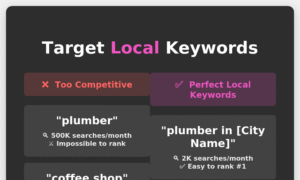
What to do:
Homepage optimization:
- Title tag: “[Service] in [City] | [Business Name]”
- H1 heading includes your city/neighborhood
- First paragraph mentions your location naturally
- Add “Proudly serving [City] since [Year]” somewhere visible
Location pages: If you serve multiple cities, create a dedicated page for each one:
- URL: yoursite.com/[service]-[city]
- Title: “[Service] in [City] | [Business Name]”
- Content: 800+ words about serving that specific area
- Include neighborhood names, local landmarks, area-specific tips
Schema markup: Add Local Business schema to your homepage (sounds technical but most website builders have plugins for this)
Footer: Include your full address and phone number on every page
Pro tip: Use a keyword research tool to find what locals actually search for. Sometimes it’s not what you think!
Example: In some cities people search “HVAC repair” – in others they search “air conditioning service.”
Find Your Local Keywords with PokkadotSEO – Try Free →
Step 5: Get Reviews (The Right Way)
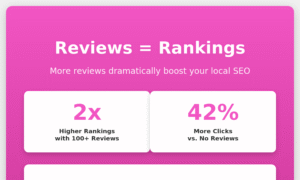
Reviews are LOCAL SEO GOLD. More reviews = higher rankings = more customers = more reviews. It’s a beautiful cycle.
What to do:
Make it easy:
- Create a short link to your Google review page (use a URL shortener)
- Add a “Review Us” button to your website
- Include the link in email signatures
- Print QR codes on receipts, business cards, and table tents
Ask at the right moment:
- Right after a successful service/purchase
- When customers compliment you
- After resolving a problem well
The script that works: “We’re a small local business and reviews really help us compete with the big chains. Would you mind taking 30 seconds to leave us a quick review on Google?”
Respond to every review:
- Thank positive reviewers by name
- Address negative reviews professionally (never argue!)
- Include keywords naturally in your responses
Pro tip: Aim for 3-5 new reviews per month. That shows Google your business is active and customers are happy.
Why it works: Businesses with 100+ reviews rank significantly higher than those with fewer. Reviews also improve click-through rates because people trust businesses with social proof.
Step 6: Create Location-Specific Content
Content tells Google what you do AND where you do it.
What to do:
Blog post ideas:
- “Top 10 [Your Service] Tips for [City] Residents”
- “[City] [Industry] Guide: Everything You Need to Know”
- “Why [Neighborhood] Residents Choose [Business Type]”
- Event recaps: “[Business Name] Sponsors [Local Event]”
- Local news: “How [Recent Local News] Affects [Your Industry]”
Service pages: Create detailed pages for each service you offer:
- What the service includes
- Who it’s for
- Why it matters in your specific area
- Real results from local customers
- Clear call-to-action
Pro tip: Mention local landmarks, neighborhoods, and even competitor names (subtly). Example: “Located just minutes from [Local Park] in the heart of [Neighborhood].”
Optimize Your Content with PokkadotSEO’s Content Analyzer – Try Free →
Step 7: Build Local Backlinks
Backlinks = other websites linking to yours. They’re like votes of confidence to Google.
What to do:
Easy wins:
- Join your local Chamber of Commerce (they’ll list you on their website)
- Sponsor local sports teams, schools, or charity events (get your link on their sponsor page)
- Get featured in local news (send press releases about interesting business developments)
- Partner with complementary local businesses (wedding photographer + florist + caterer, all linking to each other)
Local directories: Get listed in:
- City/county business directories
- Tourism board websites
- Local blog “best of” lists
Content opportunities:
- Write guest posts for local blogs
- Offer to be interviewed by local podcasters
- Create resources that local organizations want to link to
Pro tip: One high-quality local backlink is worth more than 100 random directory links.
Why it works: Local backlinks signal to Google that you’re an established, trusted business in your community.
Step 8: Optimize for “Near Me” Searches
“Near me” searches have exploded in recent years. Time to capitalize.
What to do:
Make your site mobile-friendly:
- Use Google’s Mobile-Friendly Test tool
- Make sure buttons are easy to tap
- Phone numbers should be clickable (so people can call with one tap)
Add location signals:
- Include an embedded Google Map on your Contact page
- Add driving directions from major landmarks
- Mention nearby businesses, streets, or neighborhoods
Create “near me” content:
- “[Service] Near Me in [City]: What You Need to Know”
- “Looking for [Service] Near [Neighborhood]? Here’s What to Expect”
Schema markup: Make sure your LocalBusiness schema includes:
- Geo coordinates
- Service area
- Business hours
Why it works: Google knows when someone searches “near me” they want businesses close to their current location. The more location signals you give, the more confident Google is about showing you.
Step 9: Track Your Local Rankings
You can’t improve what you don’t measure.
What to track:
Google Business Profile insights:
- How many people view your listing
- How many click to your website
- How many call you
- How many ask for directions
Search rankings:
- Track your position for “[service] + [city]” keywords
- Monitor “near me” rankings
- Watch competitor positions
Website analytics:
- How much traffic comes from Google Maps
- Which location pages get the most visits
- Conversion rate from local traffic
Pro tip: Check rankings from different locations around your city. You might rank #1 from your office but #5 from across town.
See How You Compare with PokkadotSEO’s Competitor Analysis – Try Free →
Step 10: Keep Your Information Updated
Local SEO isn’t “set it and forget it.”
Monthly tasks:
- Post to Google Business Profile (photos, updates, offers)
- Ask for and respond to reviews
- Check for broken links on your website
- Update hours for holidays or special events
Quarterly tasks:
- Audit your citations for accuracy
- Create fresh local content
- Review and update service pages
- Check competitor rankings
Annually:
- Refresh photos on Google Business Profile
- Update “About Us” and business descriptions
- Review and optimize all location pages
Your Local SEO Action Plan (Next 30 Days)
Feeling overwhelmed? Don’t be. Focus on these high-impact actions first:
Week 1:
- [ ] Claim and fully optimize your Google Business Profile
- [ ] Audit your NAP consistency across major listings
- [ ] Ask your last 10 happy customers for reviews
Week 2:
- [ ] Add location keywords to your homepage title and H1
- [ ] Create one piece of local content (blog post or service page)
- [ ] Build 3 local citations
Week 3:
- [ ] Create location pages if you serve multiple cities
- [ ] Add schema markup to your site
- [ ] Reach out to 3 local businesses about partnerships
Week 4:
- [ ] Set up review request automation
- [ ] Start tracking your local rankings
- [ ] Create a content calendar for monthly local blog posts
The Small Business Advantage
Here’s the thing that big corporations don’t want you to know: You have a MASSIVE advantage in local SEO.
You actually care about your community. You know your customers by name. You sponsor Little League teams and show up to city council meetings.
That authentic local presence? It’s pure gold for local SEO.
Every photo you post from a local event, every review from a neighborhood customer, every mention in a community blog – it all builds your local authority.
The national chains can’t compete with that, no matter how big their marketing budget.
The Tools That Make Local SEO Easy
Let’s be real – doing all of this manually takes FOREVER.
That’s why we built tools specifically for small business owners who need to compete locally but don’t have time to become SEO experts:
PokkadotSEO gives you:
- Content Analyzer to optimize your location pages
- Keyword Research tool to find what locals actually search for
- Competitor Analysis to see how local rivals rank
- Meta Tag Generator for click-worthy search listings
Get 10 free credits when you sign up – no credit card required.
👉 Get Free Access to All Local SEO Tools
Your Local Market is Waiting
While your competitors are hoping customers stumble through their door, YOU can be the business everyone finds first.
Every “near me” search is a customer raising their hand saying “I need help RIGHT NOW.”
Be there when they search.
Follow this checklist. Track your progress. Adjust what isn’t working.
In 90 days, you’ll wonder why you didn’t start sooner.
Ready to dominate local search? Start with the easiest win – optimize your Google Business Profile TODAY.
Questions about local SEO for your specific industry? Drop a comment and I’ll give you customized advice!